
Configuring
To edit the Linkurious Enterprise configuration, you can either edit the configuration file located at linkurious/data/config/production.json
or use the Web user-interface:
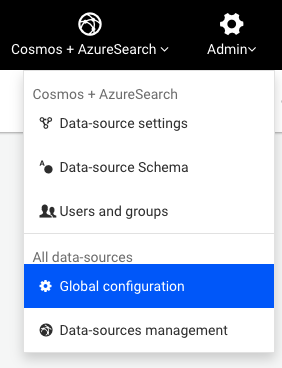
Using an administrator account, access the Admin > Global configuration menu to edit the Linkurious Enterprise configuration:
Some configuration changes will require restarting the server to be applied. Linkurious Enterprise will notify you and offer you to restart from the Web UI only if you made the changes from the Web UI. If you modified the production.json file manually, changes will not be applied immediately, and you will need to restart Linkurious Enterprise.
Configuration sections are organized by category.
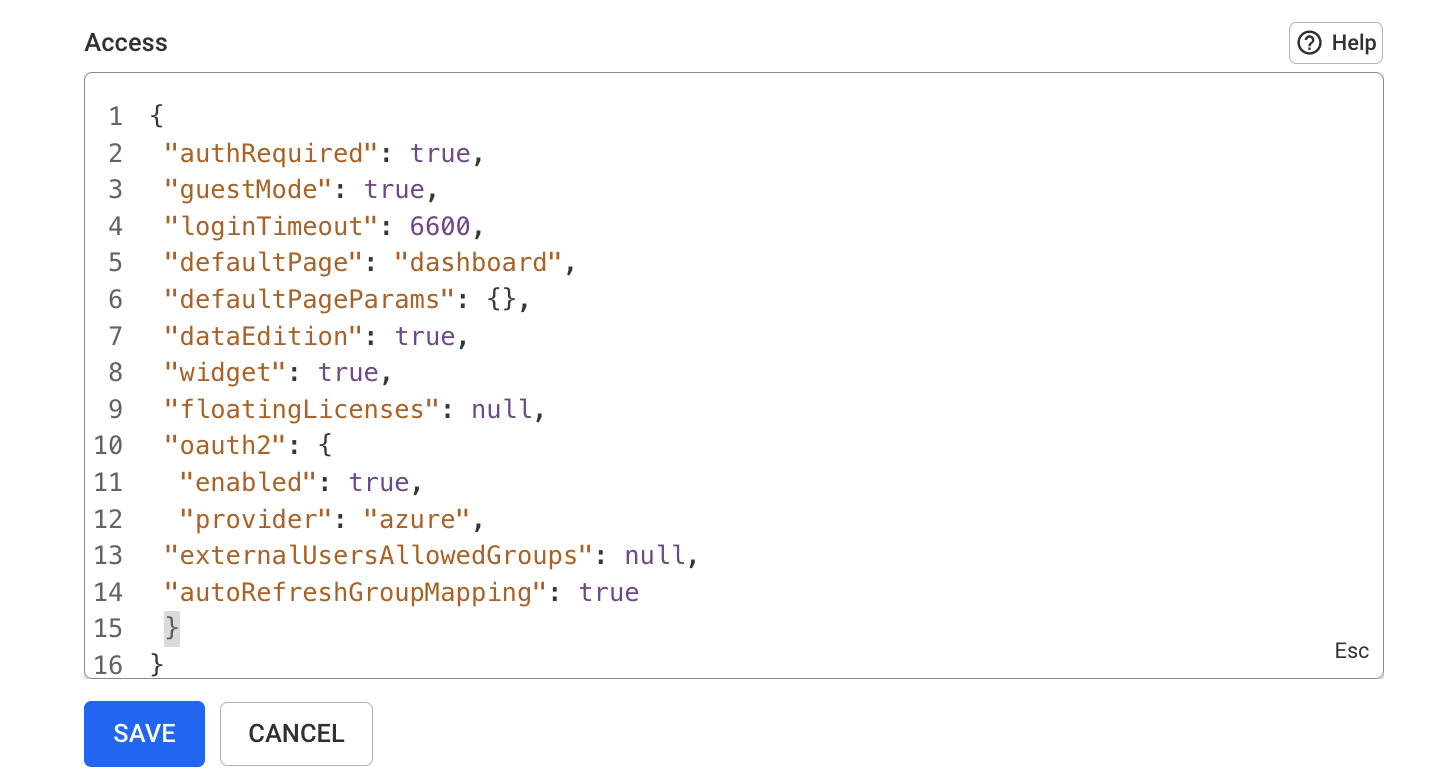
ℹ️ Password fields are obfuscated in the Web UI, but can be edited.
Variable expansion
You can also use dynamic variables in the configuration: these variables will be replaced by values read from environment variables or files at runtime.
For example, if you set {"myKey": "$ENV:NEO4J_PASSWORD"} in the configuration, the value of
myKey will take the value of the NEO4j_PASSWORD environment variable at runtime.
The following variable expressions are supported:
$ENV:VAR1: replaced with the value of theVAR1environment variable;$ENV-NUMBER:VAR2: replaced with the value of theVAR2environment variable, interpreted as a number;$ENV-JSON:VAR3: replaced with the value of theVAR3environment variable, interpreted as JSON;$FILE:/path/to/file: replaced with the content of the file at/path/to/file, parsed as UTF-8 text.
In the configuration object, you can use the following syntax:
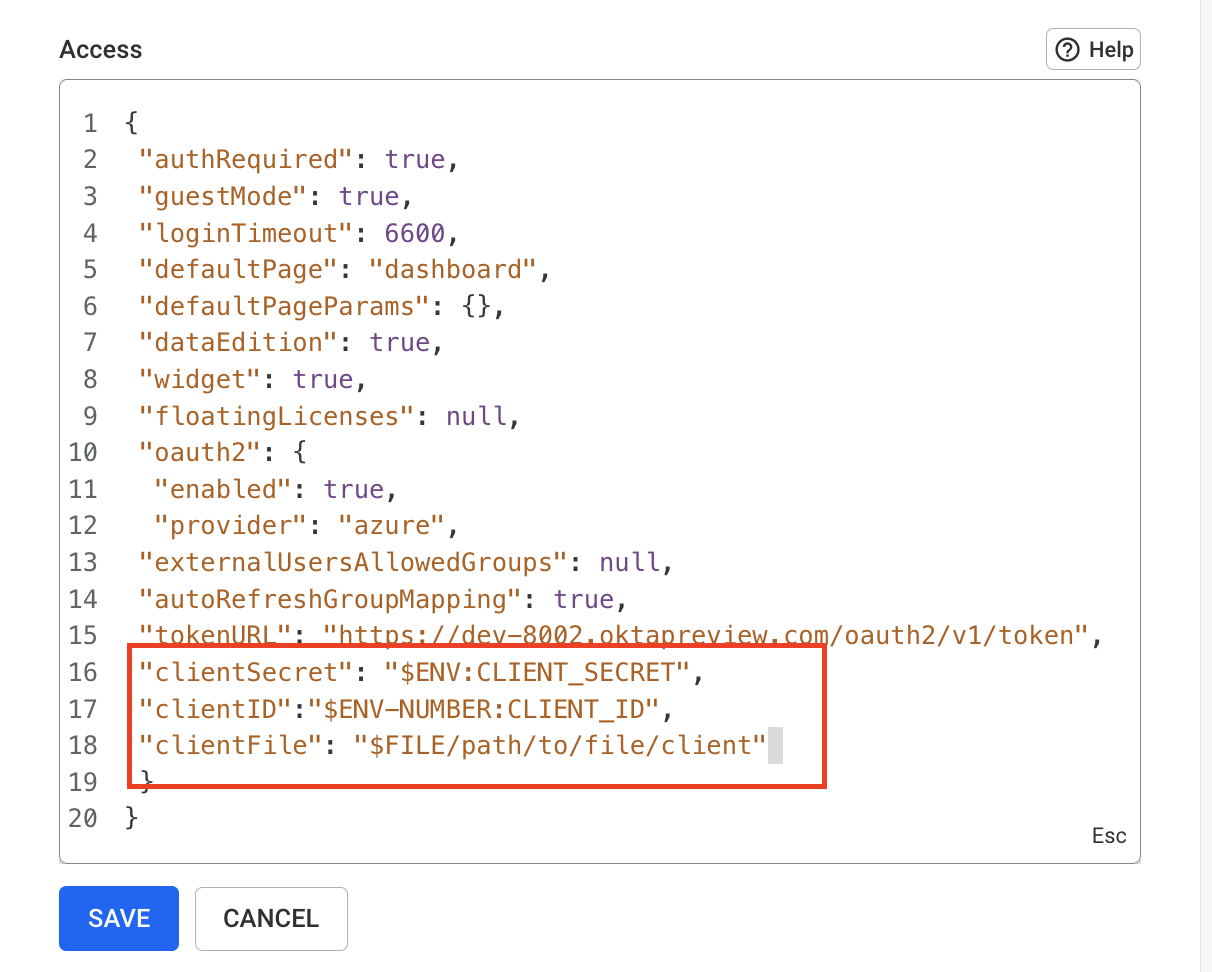
When you are finished changing, click Save.
ℹ️ Limitations with the
$ENV-JSONexpansion:
$ENV-JSONdoes not work when used at the root level or at the first level of the configuration (for example for the wholeserver.*configuration key).$ENV-JSONdoes not work when used at any level within thedataSource.*configuration key.
🛡 Security considerations for configuration variable expansion:
$FILEexpansion is limited to files of 1MB or less$FILEexpansion can be constrained to only resolve files under a certain folder, for example, setting theLKE_CONFIG_INJECTABLE_FILE_ROOTenvironment variable to./my-filesonly allows files under thelinkurious/data/my-filesfolder to be injected in the configuration.- Variable expansion can be switched to read-only mode by setting the
LKE_CONFIG_EXPANSION_READ_ONLYenvironment variable to "true".
Environment variables
In addition to the configuration file, the following environment variables can be used to change the behavior of Linkurious Enterprise:
LKE_PLUGINS- Example:
LKE_PLUGINS='["query-ai"]' - Default value:
["config-migration", "plugin-manager", "query-ai", "third-party-data", "webhook-manager"]; - Description: A JSON-encoded array of official plugin names that should be installed (i.e., copied from
./data/plugins-availableto./data/plugins) at startup.
- Example:
LKE_PLUGINS_ENABLE_UPLOAD- Example:
LKE_PLUGINS_ENABLE_UPLOAD=true - Default value:
false - Description: Whether administrators are allowed to upload plugins from the Linkurious Enterprise web interface.
- Example:
LKE_STD_LOG_FORMAT- Example:
LKE_STD_LOG_FORMAT=json - Default value:
text - Description: Whether to generate logs on the standard output as text (
text) or JSON (json). This is mainly used to make the Docker version of Linkurious Enterprise generate JSON logs.
- Example:
LKE_CONFIG_INJECTABLE_FILE_ROOT- Example:
LKE_CONFIG_INJECTABLE_FILE_ROOT=./my-config-files/ - Default value: none (no constraints)
- Description: Force
$FILEvariables to be resolved in this folder. Relative paths are resolved from the data-folder (see details).
- Example:
LKE_CONFIG_EXPANSION_READ_ONLY- Example
LKE_CONFIG_EXPANSION_READ_ONLY=true - Default value:
false - Description: Whether to make configuration variable expansion read-only. In read-only mode, only variables that exist in the configuration file at startup are used, and editing variables (or adding new ones) at runtime via the Web interface is ignored.
- Example
LKE_DATA_PATH- Example:
LKE_DATA_PATH=/var/lib/linkurious-data - Default value:
../data - Description: The path of the data-folder used to read and write the application state
(configuration files, logs, etc.). Relative paths are resolved from the
systemfolder.
- Example:
NODE_EXTRA_CA_CERTS- Example:
NODE_EXTRA_CA_CERTS=./customCA.pem - Default value: none
- Description: The path to a file with additional certificate authorities (see details).
- Example:
NODE_TLS_REJECT_UNAUTHORIZED- Example:
NODE_TLS_REJECT_UNAUTHORIZED=0 - Default value:
1 - Description: Whether to reject invalid TLS security certificates (see details).
- Example:
NODE_USE_ENV_PROXY- Example:
NODE_USE_ENV_PROXY=1 - Default value:
0 - Description: When set to
1, will honor theHTTP_PROXY,HTTPS_PROXYandNO_PROXYenvironment variable to proxy outgoing HTTP(S) traffic.
- Example:
HTTP_PROXYorHTTPS_PROXY- Example:
HTTPS_PROXY=http://my-proxy.my-company.com:8080 - Example (with proxy authentication):
HTTPS_PROXY=http://username:password@my-proxy.my-company.com:8080 - Default value: none
- Description: When used in combination with
NODE_USE_ENV_PROXY=1, will use the proxy at the given URL to proxy outgoing HTTP traffic (when usingHTTP_PROXY) or HTTPS traffic (when usingHTTPS_PROXY)
- Example:
NO_PROXY- Example:
NO_PROXY=localhost,127.0.0.1,.my-company.com(see details) - Description: When used in combination with
NODE_USE_ENV_PROXY=1, will not use the proxy defined byHTTPS_PROXY(orHTTP_PROXY) for the matching IPs or domains.
- Example:
LKE_ADMIN_APPLICATION_NAME- Example:
LKE_ADMIN_APPLICATION_NAME=my_admin_app - Default value: none
- Description: When used in combination with
LKE_ADMIN_APPLICATION_APIKEY, this defines the name of the admin API application to create or update.
- Example:
LKE_ADMIN_APPLICATION_APIKEY- Example:
LKE_ADMIN_APPLICATION_APIKEY=1234567890abcdef - Default value: none
- Description: When used in combination with
LKE_ADMIN_APPLICATION_NAME, this defines secret key of the admin API application to create or update.
- Example:
How to set environment variables
On Docker:
When Linkurious Enterprise is installed as a service:
- Environment variables must be set by editing the
"env"section of server in the./manager/manager.jsonfile, under the data-folder. - To edit this file: stop and uninstall the Linkurious Enterprise service, edit the file, then reinstall the service.
Using a configuration overlay
A configuration overlay is a mechanism that allows to maintain a subset of configurations in a separate file
(called product-overlay.json), which is automatically merged with the main configuration.
This mechanism enables:
- Locking some configuration fields to prevent them from being changed by users via the Web UI;
- Pushing configuration changes from automatic deployment tools via a file that is never written by Linkurious Enterprise (e.g. via Configuration-as-Code tools).
For example, if you want to change the server.listenPort configuration from 3000 to 8080 and prevent users from
changing it back, you can use the overlay mechanism as follows:
- Configuration file (
production.json):{ // [...] "server": { "listenPort": 3000, "listenPortHttps": 8443, "clientFolder": "server/public", "basePath": "my-folder" } // [...] } - Overlay file (
production-overlay.json):{ "version": "4.3.13", "server": { "listenPort": 8080, "basePath": "$UNSET" } }
The values of the overlay file will be merged field-by-field with the configuration file, resulting in the following final configuration:
{
  // [...]
  "server": {
    "listenPort": 8080, // "listenPort" has be overwritten by the overlay
    "listenPortHttps": 3443,
    "clientFolder": "server/public",
    // "basePath" has been removed by the overlay
  }
  // [...]
}
Using a configuration overlay file
To set up an overlay configuration file:
- You must create a file called
production-overlay.json, stored indatadirectory, along the main configuration file (production.json); - The overlay file must contain a
versionproperty, with a value lower or equal to the current version of Linkurious Enterprise (e.g.,4.3.13) (see how the overlay version property works);
Overlay-specific behaviors to keep in mind:
- Except for the version field, no property is mandatory in the overlay file, and you can only specify the configuration fields that you need to overwrite or lock;
- Changes in the overlay file are only taken into account after restarting Linkurious Enterprise;
- The "obfuscation" option is not applied to the overlay file. When adding secrets to the overlay file, you should either use variable expansion or use an already-obfuscated value;
- To remove values from the main configuration, use the
"$UNSET"value in the overlay file.
Using an overlay file for Configuration-as-Code
The overlay mechanism allows automatic deployment tools to push and freeze a subset of configurations.
A typical example is the need to preconfigure authentication and the external user-data store connection in a
Kubernetes deployment. We use this mechanism in our Kubernetes deployment via the config
value of our Helm chart.
💡 The same mechanism is relevant for standard deployments performed via automation scripts.
How the overlay version property works
Over different Linkurious Enterprise versions, configuration fields may be added, removed, or migrated. The version property
indicates for which version of Linkurious Enterprise a configuration file was written.
The version of the main configuration file and the version of the overlay file may be different.
When the application starts, the following steps are performed:
- The main configuration file is read. If its
versionis lower than the current version of Linkurious Enterprise, it is migrated and the migrated configuration is written back to the configuration file. - The overlay file is read. If its
versionis lower than the current version of Linkurious Enterprise, it is migrated (the migrated overlay is not written back to the overlay file, but only used for the merge process). - The overlay is merged with the main configuration (see how the overlay is merged with the main configuration). The merged configuration is written back to the main configuration file and used by Linkurious Enterprise at runtime.
How the overlay is merged with the main configuration
When loading the configuration, the application reads both the main configuration file and the overlay file, and merges them together to get the final configuration used at runtime.
When the configuration is updated at runtime (e.g. via the Web UI of the API), the new configuration is merged with the overlay before being written back to the main configuration file.
The merge process is a field-by-field merge between the main configuration and the overlay file:
- If the field only exists in the
overlay, the value from the overlay is used; - If the field is a simple value (string, number, boolean) or contains a variable expansion:
- If the field does not exist in the overlay, the value from the main configuration is kept;
- If the field exists in the overlay, the value from the overlay is used (potentially overwriting the value from the main configuration).
- If the field is an object, the merge process is applied recursively for each sub-field;
- If the field is an array, the process will merge the elements at the same position and add any eventual extra item.
- If the field kind is different in the overlay and in the main configuration, the value from the overlay is used (e.g. if the field is an object in the main configuration and a variable expansion in the overlay, the overlay is used).
A typical example involving an array in the configuration is the data-source field.
If the overlay has a single data-source configured and a user manually adds a second data-source, the final
configuration will have an array of two data-sources, where the first one matches the one defined in the overlay.
If a second data-source is added later to the overlay, it will be merged with the second existing data-source in the
main configuration, potentially creating an invalid configuration.
The overlay unset mechanism
To remove an existing property from the configuration file, you should define the desired property
with the special value "$UNSET".
A typical example, is when configuring an external user-data store.
A robust overlay configuration for defining a MySQL database will use the
"storage": "$UNSET" as follows:
{
  "version": "4.3.13",
  "db": {
    "name": "linkurious",
    "username": "MYSQL_USER_NAME",
    "password": "MYSQL_PASSWORD",
    "options": {
      "storage": "$UNSET",
      "dialect": "mysql",
      "host": "MYSQL_HOST",
      "port": 3306
    }
  }
}
The necessity of using $UNSET for the db.options.storage field requires to unroll the merge process:
- The default value for the
dbfield in the main configuration is the following (see SQLite configuration):{ // [...] "db": { "name": "linkurious", "options": { "dialect": "sqlite", "storage": "server/database.sqlite" }, }, // [...] } - If we try to configure the
overlaywithout using$UNSET, using the following overlay:{ "version": "4.3.13", "db": { "name": "linkurious", "username": "MYSQL_USER_NAME", "password": "MYSQL_PASSWORD", "options": { "dialect": "mysql", "host": "MYSQL_HOST", "port": 3306 } } } - Then, the merged configuration still contains the
db.options.storagefield, which is not valid for MySQL. This would be detected as an invalid configuration and prevent the application from starting.{ // [...] "db": { "name": "linkurious", "username": "MYSQL_USER_NAME", "password": "MYSQL_PASSWORD", "options": { "dialect": "mysql", "storage": "server/database.sqlite", // unexpected "storage" field was kept because "$UNSET" was not used "host": "MYSQL_HOST", "port": 3306 } } // [...] }